

Reconnaissance takes up more of an expert's time than any other part of a test. It means reading the application's public JavaScript files, looking for the places where user input enters the code, and checking what happens to it next. DA1MON does the same work, only in parallel across many paths at once.
On dns.pl, the site of the .pl domain registry run by NASK, about five minutes passed between starting the swarm and having a working proof of code execution. The report went to the bug bounty program and came back as a duplicate, because somebody had described the same vulnerability earlier. We simply started too late. The path itself is interesting enough to be worth showing, because this is not an ordinary parameter reflected into HTML, but an injection into the template compiler.
TL;DR - Key takeaways
- The entry point: one search parameter
- The page rendered "da1mon49"
- Why the phrase reaches the compiler at all
- From arithmetic to code execution
The entry point: one search parameter
The search results page is a client-side application written in Vue 3, a standard single-page app. The search phrase sits in a GET parameter and comes back on the page in the results heading.
The reflection worked at three addresses: /search-results, /search-results/{n}, and the English version /en/search-results. All three use the same rendering path.
The first test is always the same one and it does no harm. Instead of looking for a less-than sign, which modern front ends almost always encode, we check whether the application will do some arithmetic for us:
The page rendered "da1mon49"
The page rendered a heading with the result of the multiplication, and the raw string with the curly braces was nowhere in the document tree. That means the phrase is not text on the page but part of a template that the browser compiles on arrival. The vulnerability class is called Client-Side Template Injection.
The da1mon marker in the payload is our tag from the DA1MON-RECON methodology. It makes it obvious in screenshots which part of the text came from us and which came from the site.
CSTI: a template instead of text
In an ordinary XSS you inject HTML tags and hope the server will not encode them. In CSTI you need no tag at all. Template syntax is enough, and the framework interprets it for you in the browser. Filters tuned for HTML special characters never see it.
Why the phrase reaches the compiler at all
Two things combine here, and each of them looks harmless on its own.
The first is the translation layer. The function that substitutes values into translation strings inserts the phrase into the placeholder without any encoding. The only transformation along the way is doubling the dollar sign. User input therefore enters the translation string exactly as it arrived.
The second is how the application renders that string. Instead of inserting it as text, it hands it to the Vue 3 runtime template compiler. The compiler builds a render function from it and runs it. From that point on, anything inside double curly braces is a JavaScript expression rather than a string.
From arithmetic to code execution
A computed 7*7 is not yet proof of code execution. Vue renders expressions inside a proxy that hides bare globals: a reference to window or document returns nothing there. For a moment it looks like a safe sandbox, but it is not one.
Vue 3 does not sanitise template expressions, because the template is assumed to come from the developer rather than from the user. It is therefore enough to reach the constructor of any object, and through it the Function constructor. The body of a function built that way runs in the global scope, where all the real objects are in place.
The pattern has been known for years and looks roughly like this: [].constructor.constructor('code')(). The first lookup gives the Array constructor, the second the Function constructor, and the call runs the supplied code.
The proof of execution was the browser's native print dialog opening in the dns.pl context. That dialog cannot be opened any other way than by running code in the browser, so there is no doubt that the application did more than evaluate an expression. Two helper payloads confirmed the scope: one returned a number from a return statement, the other the type of a global object. Both results landed in the page heading next to our marker.
We deliberately withhold the working payload
The full string that made it past the filter stays in the report for the system owner. The mechanism described above is enough to understand the problem and check your own application, while not letting anyone reproduce the attack against someone else's system.
A CSP header that does not apply
With a bug like this, one line of defence is left: Content Security Policy. A correctly configured policy does not allow code built from a string to run, so the whole Function constructor trick ends with an error in the console.
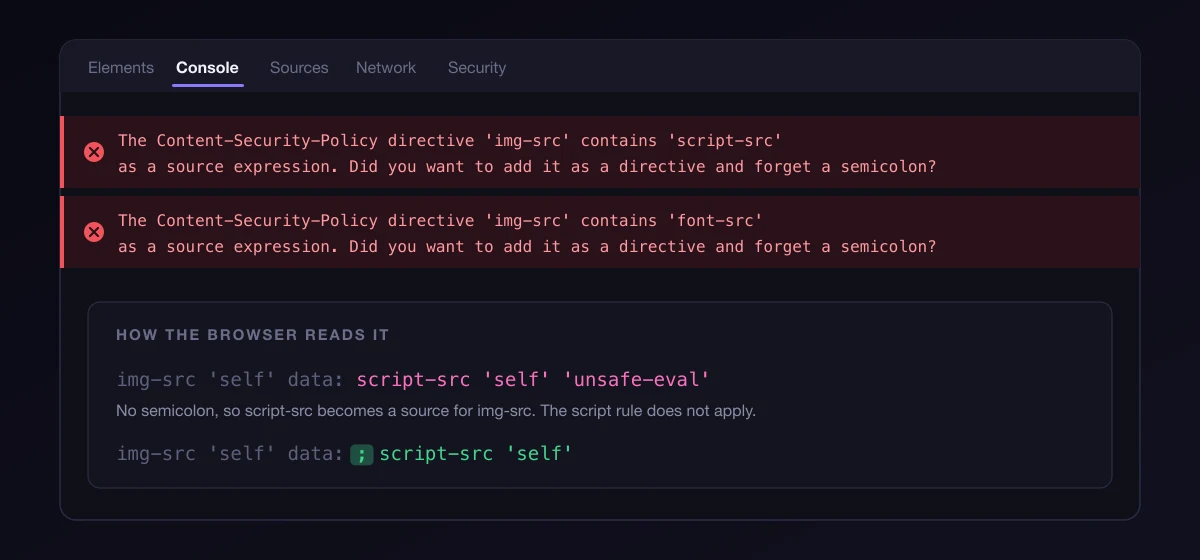
Here the CSP header existed, it was just put together badly. The semicolons separating the directives were missing, so the browser treated the name of one directive as a source for the previous one. The script rule therefore did not apply at all, and since there was no default directive either, nothing stopped a function from being built out of text.
The most telling part is that the browser says so itself. The console shows a warning along the lines of "'img-src' contains 'script-src' as a source expression. Did you want to add it as a directive and forget a semicolon?". The message was available to anyone who opened developer tools on that page.
A WAF also sat in front of the application, stripping common signatures: alert, document.domain, fetch and a few others. A filter like that softens the impact but does not remove the cause. Splitting a method name into two pieces joined at runtime was enough to stop the signature from matching, and the print dialog call was not on the list in the first place.
Check your CSP automatically
A typo in a CSP header does not break the page and leaves no trace in application logs. The policy simply stops working, quietly. Put header checking into CI or monitoring instead of trusting that a string pasted correctly once will stay that way.
What this means for the owner of such a service
Running arbitrary code in the context of a trusted domain always brings the same consequences, and their weight depends on whose domain it is.
The victim has to click a prepared link, because this is a reflection rather than a stored injection. After the click, the code runs with the privileges of their session.
Our preliminary CVSS 4.0 assessment is CVSS:4.0/AV:N/AC:L/AT:N/PR:N/UI:A/VC:H/VI:L/VA:N/SC:L/SI:L/SA:N: remote, no privileges required, victim interaction needed. The final score belongs to the analyst on the program's side.
- Reading session data and tokens, which is a route to taking over a registrant's or a registrar's account.
- Actions in the domain management panel performed on behalf of the logged-in person.
- Phishing served from an address the user trusts, because it is the address of the national domain registry.
How to get rid of it
The fix comes in four steps and none of them needs anything unusual.
- Do not compile user data as a template. This is the actual fix. Insert user text through text interpolation or
textContent, never into a string that later goes to the compiler. - Encode the phrase before substituting it into a translation. The translation layer should treat placeholder values as data rather than as part of a template. Doubling the dollar sign is not enough.
- Build the application with precompiled templates. A Vue build without the runtime compiler does not have this path at all, and it ships less code.
- Fix the CSP syntax and add a default directive. Without
unsafe-eval, building a function from a string stops working even if the injection remains.
Order matters
CSP and a WAF are extra layers that do not replace a fix in the code. If you only repair the header, the vulnerability is still there, waiting for the first browser that parses the policy differently or the first configuration change.
Why the swarm found it so fast
There was nothing remarkable about it. The whole job came down to reading files the server sends to every visitor anyway, and connecting four facts: that translations do not encode values, that the translation string goes to the compiler, that the Vue proxy can be bypassed through a constructor, and that the CSP header is badly assembled.
A human does the same thing, only slower, because the files are minified and have to be read one by one. DA1MON reads them in parallel and builds a fact graph that its hypotheses stand on. The confirmation was still done by a pentester, by hand, in a real browser. That is how we work whether the target is ours or comes from a bug bounty program: no finding goes any further until a human reproduces it.
Summary
On dns.pl, the search parameter was placed into a translation string without encoding, and that string was then compiled in the browser by the Vue 3 runtime template compiler. That was enough for an expression in template syntax to execute as JavaScript in the context of a trusted domain. The CSP header that could have stopped it did not work because of missing semicolons, and the WAF only stripped known signatures. DA1MON went from the first request to proof of code execution in about five minutes, and the report came back as a duplicate because we started too late.
Frequently asked questions
How does CSTI differ from ordinary XSS?
In XSS you inject HTML or JavaScript and rely on the browser to run it. In Client-Side Template Injection you inject the framework's template syntax, and the framework itself runs the code when it compiles the template in the browser. You need no less-than sign and no tag, so filters tuned for HTML entities see nothing. In Vue 3 the result is the same as XSS, because template expressions are not isolated in any way.
Isn't the Vue 3 proxy a sandbox for expressions?
No. The proxy hides bare globals, so a reference to window or document returns nothing, but that is an obstacle rather than a security boundary. Access to any object's constructor leads to the Function constructor, and the body of such a function runs in the global scope. The Vue documentation states plainly that templates are meant to come from the developer and that user-supplied content must never be compiled.
Would a correctly configured CSP have stopped this attack?
Largely, yes. Building a function from a string requires permission to use eval, so a policy without unsafe-eval would have interrupted execution and left an error in the console. In this case the header was assembled incorrectly: the semicolons were missing, so the name of one directive was treated as a source for the previous one and the script rule did not apply at all. CSP is still an extra layer rather than a substitute for a fix in the code.
Why was the report marked as a duplicate?
Because somebody reported the same vulnerability earlier. In bug bounty programs the first report gets the points, regardless of how detailed the later ones are. Our reconnaissance took about five minutes; we just launched it too late. It is still a useful result for us, because we measure the time it takes to reach a confirmed finding, not the points scored in a program.
How do I check whether I have the same problem?
Look for places in the code where user text reaches anything that compiles a template in the browser. Most often these are messages, search result headings, and a translation layer with placeholders. A quick test is to put an expression with simple arithmetic in your framework's syntax into a parameter and see whether the page shows the result instead of the literal text. While you are at it, review your CSP header for semicolons.
Bibliography
The official Vue security documentation, including an explicit warning never to use user-supplied content as a component template.
A description of the CSTI vulnerability class, how template engines execute code in the browser, and the typical places it shows up.
The OWASP reference on XSS attacks: types, vectors, and defence mechanisms.
Documentation for the CSP header, including directive syntax and the semicolons that separate directives.
The site of the .pl domain registry operated by NASK, which this report concerned.